| F1 | At the top it shows the gap to the rival ahead, in the middle the time of your last lap, below that the gap to the car behind, and at the very bottom the number of laps completed. In practice it shows your best and last laps, with the number of laps completed at the very bottom as well. | 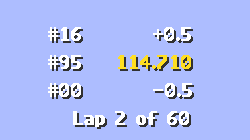 |
| F2 | Here you are shown your current position and the four rivals closest to you, with time gaps to the leader. Using the "<" and ">" keys you can scroll the list. | 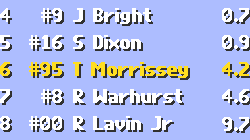 |
| F3 | Top to bottom: the amount of fuel in the tank, the amount of fuel you burn per mile, the number of laps you can drive at the current fuel consumption, and the amount of fuel that will be added at the pit stop. Using "<" and ">" you can change that figure. Remember that all of these pop-ups can be opened, and the information in them changed, while the game is paused. | 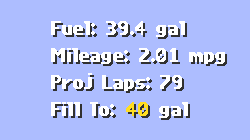 |
| F4 | Here your tyre temperatures are shown (°F). O = temperature on the outside, M = in the middle and I = on the inside. When a temperature figure glows yellow, your tyre is hot; when it glows red, it has overheated and may lose grip on the track. | 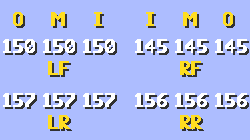 |
| F5 | In this menu you will see your tyre pressures and their compound (Hard, Medium, Soft); the bar below each tyre indicates its wear. When a tyre is worn, the bar is short and red. With the space bar you can move the cursor between tyres, and with the "<" and ">" keys you can change the pressure. Pressing "ENTER" toggles the check mark next to a tyre — if it is set, the tyre will be replaced at the next pit stop. The "?" key changes the tyre compound. All changes will be made for you at the next pit stop. | 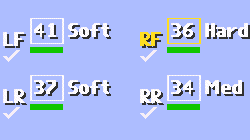 |
| F6 | Removes any pop-up display from the screen. | |
| F7 | Here you are shown the current wing settings. They can be changed ("Adjust to") with the "<" and ">" keys, moving around with the space bar. All settings will be changed for you at the next pit stop. | 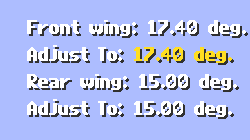 |
| F8 | Here the stagger is changed with the "<" and ">" keys. All changes will be made for you at the next pit stop. | 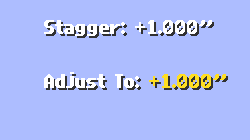 |
| F9 | The last pop-up display shows what will be done at the next pit stop. With the "ENTER" key you can toggle the setting between repairing ("repair") or not repairing ("do not repair") the car at the pit stop. | 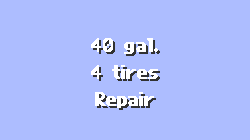 |
| F10 | Switches the cockpit view to the two external views. | |